Monday, June 14, 2010

GanttProject

In a previous post I mentioned that I was looking into open source project management software. I was a little sad to find that most of the software I tried had one glaring oversight or another. The program that I tried initially and then kept coming back to was GanttProject.

The GanttProject features that I use are:

  • Gantt chart
  • Linking (start-finish, start-start etc.)
  • Resources can be created/imported and assigned to tasks. Resource utilisation is calculated automatically
  • Completion tracking on the Gantt chart

This is a simple feature set and by far the best of what is on offer from the open source world for project management.

Tuesday, May 4, 2010

HP Flight Button Fixed with a ROM Update

I’ve been mildly annoyed for the last week with a malfunction of the flight mode button on my HP 6730s laptop. Out of the blue the button started toggling between wifi and bluetooth radios. Pressing the button allowed me to choose between bluetooth or wifi but I could never turn both radios on, or more importantly for flying turn both radios off!

After a short and very helpful online chat with HP support I updated my BIOS and everything is fixed! HP support has been awesome every time I’ve needed it.

Wednesday, April 28, 2010

Creating a WCF Web Service with VS2010 Express

Last night while I was reading up on OPC-XML the interwebs took me on a merry trail of SOAP, XML-RPC and the like that ended with WCF Web Services. I found a very good tutorial on WCF Services at http://www.xvpj.net/2008/03/08/wcf-step-by-step-tutorial/ but this was for Visual Studio 2005. I only have express versions of Visual Studio 2010 so there were some things that needed to be done differently. In the interests of posterity here is how I wrote a very simple WCF web service and a WPF client that accesses it using only Visual Web Developer 2010 Express and Visual C# 2010 Express.

Configure the Development Environment

  1. Install Microsoft Visual C# 2010 Express
  2. Install Microsoft Visual Web Developer 2010 Express installed (you can download all Express editions on one iso image at http://www.microsoft.com/express/Downloads/#2010-All)
  3. Enable Windows features:
    1. IIS Metabase and IIS 6 configuration compatibility
    2. IIS Management Console
    3. ASP.NET
        iis_features
  4. In IIS Manager, under Application Pools right click DefaultAppPool, select Basic Settings then change .NET framework version to v4.0.x
    iis_manager
  5. Install Windows SDK. This can be downloaded from http://www.microsoft.com/downloads/details.aspx?FamilyID=c17ba869-9671-4330-a63e-1fd44e0e2505&displaylang=en 

Create the Web Service

  1. First we will create the web service. To do this we need to run Visual Web Developer 2010 Express with administrator privileges so hit the start button type in “web dev” or similar and when Web Developer is highlighted press ctrl+shift+enter. This will start it as an administrator and show the UAC prompt. Alternatively locate Web Developer in the start menu then right click and select run as administrator.
  2. Select File –> New web site and choose WCF Service and name it MultiplyService
    new_web_site
  3. Add code App_Code / IService.cs  
    IService
  4. Add code to App_Code / Service.cs
    Service
  5. Run the service by pressing ctrl F5 and click the Service.svc link in the page that opens. Nothing much to see here yet, you need a client to view this data. As indicated on the page you need to run the svcutil.exe utility to generate code that will be used by the client application
    svcutil1

    The svcutil.exe utility is installed with the Windows SDK and can be found at c:\Program Files\Microsoft SDKs\Windows\v6.0a\bin

    To create the Service.cs file on the desktop try the following in a cmd prompt:
    svcutil2 
  6. That ends the WCF service. Leave all of this running, including the internet explorer window that Web Developer opened and open Visual C# Express to start on the client application.


Create the Client Application

  1. Start up Visual C# 2010 Express and select File –> New Project. Select WPF Application and name it MultiplyClient.
  2. Add a Service Reference
    service_ref

    In the Service Reference dialog paste in the address from the internet explorer window that web developer opened. Select the service and select OK
    Service_ref2
  3. Copy the Service.cs file on the desktop that was generated by svcutil into the root folder of the project
    add_cs
  4. Add two entry textboxes, a multiply button and a result textbox to the MainWindow.xaml
    mainwindow
  5. Add code to MainWindow.xaml.cs to call the service when the multiply button is clicked
    mainwindow2
  6. Modify the app.config file. Simply change the contract value from “ServiceReference1.IService” to “IService”
    appconfig
  7. Press ctrl+F5 to run the WPF application. Enter two values to multiply and hit the Multiply button, you should see the answer in the result textbox!
    clientapp


References

  1. The basic gist of WCF services:
    http://www.xvpj.net/2008/03/08/wcf-step-by-step-tutorial/
  2. Adding IIS features:
    http://www.howtogeek.com/howto/windows-vista/how-to-install-iis-on-windows-vista/
  3. Where to find the svcutil.exe utility:
    http://www.dotnetspider.com/forum/239950-Where-find-svcutil-exe.aspx

Friday, April 9, 2010

OpenVPN on Windows 7

OpenVPNI had some trouble getting OpenVPN to work on my Windows 7 laptop. After a lot of messing around it turns out to be a fairly simple operation, so to save others the messing around part here are the steps to follow.

  1. Download the latest OpenVPN windows installer from http://openvpn.net/index.php/open-source/downloads.html I used openvpn-2.1.1-install.exe
  2. Completely uninstall any previous versions of OpenVPN from your machine
  3. Install OpenVPN
  4. On the start menu right click “OpenVPN GUI” and click properties. On the Compatibility tab select “Change settings for all users” then tick the box “Run this program as an administrator”
  5. This step is not so obvious. Open the network and sharing centre and click on “Change adapter settings”. There should be a Local Area Connection with the type TAP-Win32 Adapter, right click on this and select properties. Tick the boxes next to “Internet Protocol Version 6 (TCP/IPv6)” and “Internet Protocol Version 4 (TCP/IPv4)”
  6. Copy your config and credentials files into the C:\Program Files\OpenVPN\config folder
  7. Now click OpenVPN-GUI in the start menu. You’ll have to enter your Administrator password to run it. When it’s running just right click on the OpenVPN icon in the system tray and select connect

And that’s it! I hope it works for you too, leave a comment to let me know…

Wednesday, March 24, 2010

Open Source Project Management Software

I work for a small business and lately it is becoming apparent that we need some project management software. The budget price at the moment is $0 so to stay legal I’m investigating what options are available from the open source side of the fence.

Our primary business is the development of automation software but the scope of projects often includes managing third party hardware production and procurement. The features I’m looking for in project management software are:

  • Task scheduling
  • Resource scheduling
  • Time tracking
  • Percentage completion tracking
  • Charting – Gantt charts at least

Using the above criteria in a trawl of the web I found the packages Redmine, OpenProj, Gantt Project and ClockingIT. I will follow up with a post on my experience with each of these in the coming weeks.

Thursday, March 18, 2010

The Machines are Breeding

I checked out the Artifactory space in Mt Lawley on Monday night and was really impressed with the enthusiasm of everyone there and the quality of what people are working on. There were a couple of very impressive homebrew CNC machines downstairs and three 3D printers in various stages of completion upstairs including two MakerBots.
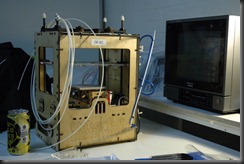
MakerBotOne of the really exciting things being built here is a RepRap or Replicating Rapid Prototyper. This is essentially a 3D printer that is capable of producing components that can be assembled to make a replica of itself, a concept that is both liberating for makers and incredibly scary at the same time. This ability to rapidly create new and improved generations of 3D printers using the current generation will ensure rapid improvement in this technology over the next few years.

The 3D printing process is something akin to a hot glue gun being controlled by a robot with 3 axes of movement. A long plastic extrusion (I’m told the plastic is the same stuff as Lego is made from) is fed into a heated extrusion head which squirts a very thin trail of molten plastic in layers to build up a 3D object.

RepRapThe white plastic component pictured here was printed on a 3D printer and is currently mounted on a RepRap that is under construction. The designs for these components are made freely available on the web allowing anyone with the time and inclination to get started on 3D printing.

One of the most interesting stories I heard at Artifactory was that a 3D printer being used to print a referee whistle – with the pea inside! This design was published on the web and within a very short period of time had been reproduced at several locations around the world. Something very significant to come from this event was the fact that the whistle was printed in places quicker than it could have been shipped there. If this concept was developed sufficiently we would have something approaching teleportation possible for printable objects.

I will definitely be heading back to Artifactory soon to catch up on what’s been happening with the RepRap and maybe even get my hands dirty with a bit of 3D printing this time.

Wednesday, March 17, 2010

Wind Down

I went for a windsurf at Scarborough last night and sadly it feels like the season is winding down and we’re heading into that time of year where we have marginal winds and early sunsets.

I’ve decided not to mothball my windsurfing gear completely this winter. I’ll try for a sail every few weeks so I don’t go backwards too far before next summer. The swell is much better in winter but the wind can be difficult so I’ll be trying out a few new spots to see how they handle the prevailing onshore storms or early morning easterlies.

I’ll probably keep the spots a secret though…